

On this page
For recurring freight jobs, keep a standing lane brief and confirm the variable details on a fresh trip sheet before dispatch.
- Sites and gate instructions
- Typical equipment requirements
- Escalation contacts
- Cargo count and booking windows
- Assigned truck and driver
- Rate and booking reference
Split the brief
Put the sites, gate instructions, typical equipment and escalation contacts in the standing brief. On each trip confirm the cargo, assigned truck, driver, rate, booking reference and time windows.
Example: the Wednesday run changes
The customer adds two pallets and moves pickup from 08:00 to 11:00. Check capacity and receiving hours before confirming. Record the change on the trip sheet. Update the standing brief when the customer confirms a permanent change.
Review after four trips
Give the brief one owner. Ask what changed every week and move those fields into the trip check.
Explore ATLAS for Synesys transport partners.
Further reading Kweli Corridor Network’s related guide.
Related Synesys guide Truck dispatch sheet template for small fleets.
Release checks for recurring freight jobs
Give each repeat lane a standing reference, a version date and one owner. Keep the usual gate, unloading equipment and contact details on that version. For each movement, record actual pallet count and weight, the receiving appointment, truck and driver, and the name of the person who confirmed the booking. Leave a field blank or mark it provisional when it has not been confirmed.
- Dispatch sends the driver the trip-specific instructions and asks for acknowledgement when a slot or gate changes.
- The collection site confirms that the cargo count and equipment match the revised brief. Dispatch asks the receiver to confirm the revised arrival window before releasing the truck.
- After delivery, file the original booking and revised confirmation under the same trip reference. Change the standing brief only when the site confirms that a change applies to future trips.
Worked example: the regular slot no longer fits
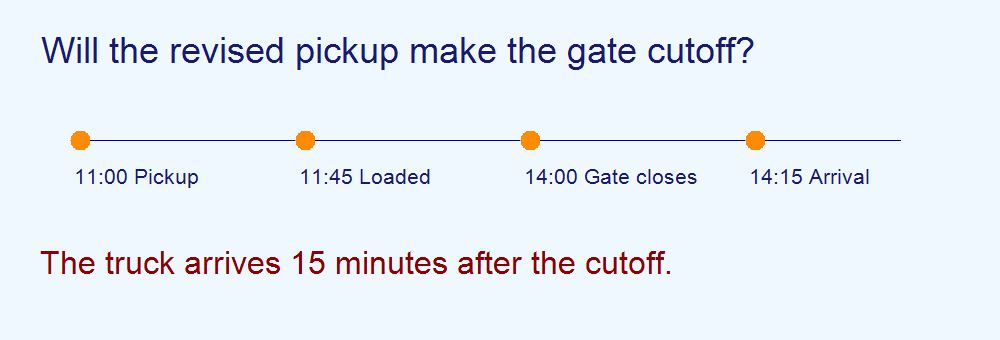
A Wednesday pickup moves from 08:00 to 11:00. Loading takes 45 minutes and the dispatcher allows 2 hours 30 minutes for travel and gate access. Estimated arrival is 14:15. If the receiver closes its gate at 14:00, ask for a later appointment or a revised pickup before assigning the truck. Record which option the customer accepted and check that the driver has the new instruction.
“An EPCIS event records what was involved in a business process step, when the event took place, where it took place”
Use the GS1 EPCIS standard as a reference when choosing fields for shared handoff records. A simple trip record can capture what moved, when and where the handoff happened, and the status.
Cover photo by Mrbobax under CC BY-SA 4.0. Cropped and branded.
Recurring freight jobs FAQs
What belongs on the standing lane brief?
Keep the usual sites, gate rules, vehicle requirements and escalation contacts. Put the actual cargo, driver, rate and confirmed slots on the trip sheet.
When should dispatch update the standing brief?
Update it after the site confirms that a change applies to future trips. Record the effective date and share the new version with dispatch and the carrier.
What happens if the standing pickup changes?
Recalculate arrival using loading, travel and gate time. Ask the receiver to confirm the revised window before releasing the truck.