
On this page
A weekly freight operations review should answer three questions. Which commitments are at risk, what went wrong on completed jobs, and who will make the next change? Give the meeting one owner. That person brings the booking board and job records, records decisions, and checks that dispatch received any revised instructions.
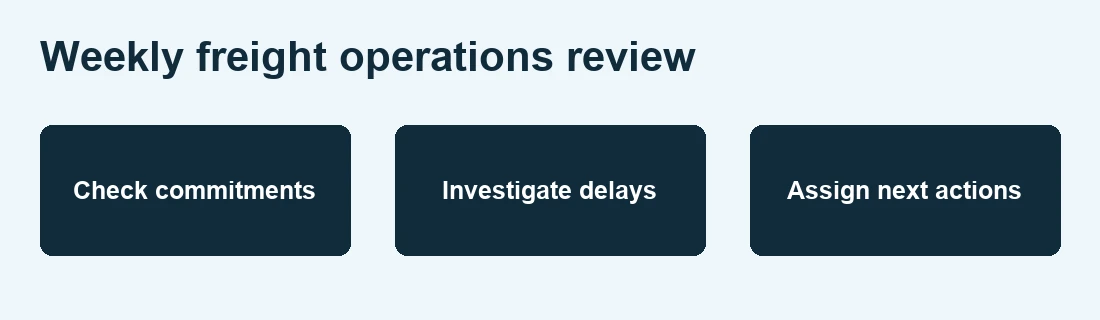
Weekly freight operations review checklist
Use the review sheet below to collect the booking board, completed job records and trip costs before the meeting.
Worked example: repeated waiting at one site
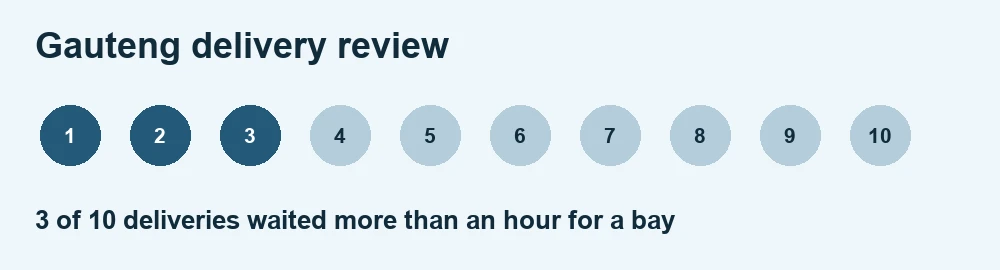
Three of ten deliveries to a Gauteng customer waited more than an hour for a bay. Two of those trucks arrived in their booked windows and one arrived early. Ask the receiver to check the booked visits and dispatch to confirm whether the early arrival had a waiting plan.
Separate the customer promise from the cause of delay
Keep the original booking window even when the receiver agrees to a new one. If your team overwrites the original time, the meeting can no longer tell whether the revised slot was a successful recovery or the truck met its first commitment. Record both times and the name of the person who approved the change.
In the Gauteng example, three of ten trucks waited more than an hour. That is 30% of all ten deliveries. It does not show the waiting rate for trucks that arrived on time, because the records above do not say how many of the other seven met their windows. Pull the arrival times for all ten before comparing booked and early arrivals. Then check gate arrival, bay start, and release separately. A long queue and a slow unload call for different actions.
Turn the meeting into dispatch decisions
- Before the meeting: Ask dispatch for the next seven days of commitments and the previous seven days of actual movements. Have accounts bring only the trips where an approved change, waiting charge or missing delivery document needs a decision.
- During the meeting: Open each disputed job and read the evidence. If nobody can confirm why a truck waited, give someone the job reference and a deadline to check with the site. Keep the reason open until that person reports back.
- Before dispatch resumes: Update the actual booking or driver instructions. If the receiver asks drivers to call ahead for a bay, add that step to the dispatch sheet with the contact number and the time to call.
Check whether the change worked next week
Compare the same receiver, time window and vehicle type where possible. Keep the counts visible. If only three comparable jobs ran, report those three outcomes rather than claiming that the problem is solved. Use the truck turnaround guide to agree which timestamps dispatch should capture.
Close with a decision and a date
Copy this weekly freight operations review action log. Carry unresolved issues into the following week.
- Evidence: Job references, the agreed window and the recorded times.
- Decision: What changes before the next comparable trip.
- Owner and deadline: Who will make the change and by when.
- Closeout: Which trips will show whether it worked. At the next review, compare those jobs with the original baseline and record whether to keep, change or drop the action.
Before closing an action, link the job records that show what changed. If your team uses ATLAS, agree where each job record and approved change can be found during the review.
Copy a one-page review sheet
| Decision area | Evidence to bring | Decision to record |
|---|---|---|
| Next week’s capacity | Bookings by day, assigned trucks and expected release windows | Which provisional jobs can be accepted and which need another vehicle or slot |
| Delivery delays | Original booking, revised booking, gate arrival, bay start and release | Who will confirm bay availability and which deliveries will test the change |
| Trip cost | Quoted cost, actual cost and the reason for each material difference | Which variances need a billing decision and which change the next quote |
| Open delivery evidence | Job references with missing or disputed proof of delivery | Who will get the evidence and when accounts will check again |
“An EPCIS event records what was involved in a business process step, when the event took place, where it took place”
Apply the same principle to a bay delay. Log the job reference, site, gate check-in and bay start. Keep the confirmed reason for the wait alongside those timestamps so the next review can distinguish a queue from a slow unload.
Further reading Kweli’s guide to reviewing completed freight jobs.
Related Synesys guide How to manage recurring freight jobs.
Weekly freight review FAQs
Which freight jobs should we discuss in the weekly review?
Start with next week’s bookings that lack a confirmed truck, slot or release time. Then review completed jobs with a disputed charge, missing proof of delivery or a delay that could recur.
How do we compare delivery performance when a slot changes?
Keep the original window, revised window and actual arrival. Report performance against the original commitment and track whether the truck met the revised slot separately.
When should dispatch close a corrective action?
Close it after the owner makes the change and links the job records that show the outcome. If too few comparable trips have run, keep the action open and set a new review date.