
On this page
Test transport management software with a dispatch problem your team recognises. The people who will use the system should try their own part of the job.
- Brief
Create the job and assign a truck. - Change
Move the slot and find the latest instruction. - Close
Complete delivery and recover the job record.
Run the same transport management software demo
Brief a booked load, assign a truck, change collection and close out delivery. Ask the dispatcher and office team to find the latest instruction and recover the record.
Score the evidence
Give each task 0 if it cannot be done, 1 if it needs a manual step and 2 if the team completes it easily. Include permissions, mobile use and record export. Write down what you observed beside every score.
Budget for adoption
Ask about onboarding, data, devices and support. Pilot one lane first and give one person responsibility for recording where the team gets stuck.
Explore ATLAS for Synesys transport partners.
Test transport management software with a missed pickup
Use a fictional six-pallet job from Germiston to Durban. Assign it to Truck 2, with pickup at 08:00 and a receiver who closes at 16:00. At 07:30, tell dispatch that the cargo will only be ready at 10:00. Ask the dispatcher to update the booking, identify who approved the change and show exactly what the driver sees. Then ask a different dispatcher to take over and find the current instruction without help.
On delivery, have the driver record five pallets accepted and one refused. Ask accounts to retrieve the signed evidence and export it with the job reference. Open the export on another device. If it contains a link that requires a supplier login, ask whether the signed record can be downloaded for billing and retained after the contract ends.
“An EPCIS event records what was involved in a business process step, when the event took place, where it took place”
Use those fields as a test of the job history. If the pickup changes, the office should be able to see the old and new instructions, when the change was made and which job it affects. Agree what counts as acceptable evidence before you compare vendors. A fast demo is less useful if the team cannot retrieve the history when a customer queries a charge.
Set pass criteria for transport management software
Separate requirements that can stop a purchase from conveniences that can wait. If signed delivery evidence is needed for billing, require the supplier to show that accounts can retrieve it without help. If drivers regularly lose signal on the lane, repeat the job on a phone with mobile data switched off. Check whether the driver can still read the latest saved instruction and what happens to a delivery update when the phone reconnects.
Test a handover between two dispatchers. Give the second dispatcher only the job number and ask them to identify the approved slot and whether the driver has acknowledged it. Ask accounts to repeat the export with a user who has ordinary billing permissions. Write down any workaround, who will run it and what happens when that person is off duty. Use those notes to distinguish a manageable manual step from a gap that could delay a delivery or an invoice.
Record what each supplier actually demonstrated
| Task | Evidence to record |
|---|---|
| Dispatch | Driver finds the load, truck assignment and pickup instructions. |
| Change the booking | Dispatcher identifies the latest instruction and who approved it. |
| Close the job | Accounts finds the signed count and refused pallet under the job reference. |
| Export the record | Accounts opens the export outside the system and retrieves the signed document. |
Compare the full cost of a pilot
Ask the supplier to price one extra office login and the replacement of one driver handset. These are different costs: the first may recur every month, while the second is usually a one-off. Record the start date for billing and check whether the pilot fee is credited if you roll out to all five trucks.
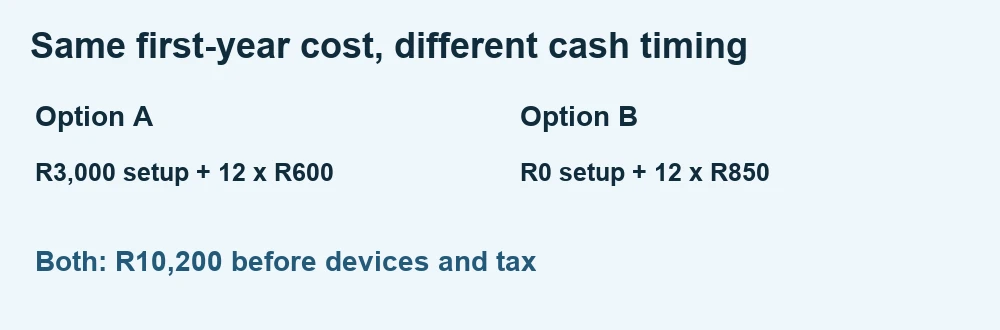
Build a one-year comparison that includes subscriptions, setup, devices and staff time. For example, a R600 monthly subscription with R3,000 setup totals R10,200 before devices and tax. A R850 monthly subscription without a setup fee has the same first-year total. Ask what it would cost to add a dispatcher or retrieve archived records. Record which fees are estimates and which are confirmed in writing.
Further reading Kweli Corridor Network’s related guide.
Related Synesys guide Your first week on ATLAS run one freight job.
Transport management software in practice
Give each supplier the same fictional job and ask the actual users to run dispatch, amend a slot, retrieve the POD and export the record. Score observed results and ask about onboarding costs separately.
Worked example
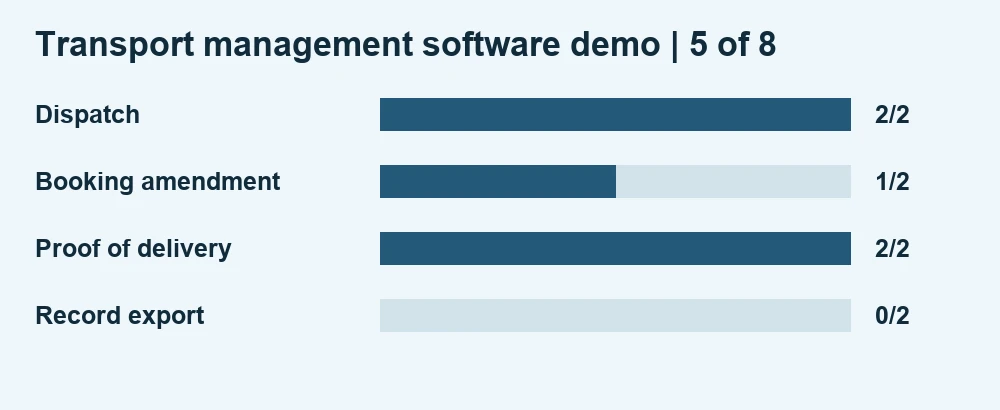
A product scores 2 for dispatch, 1 for amendment, 2 for POD and 0 for export, giving 5 out of 8. If export is required for billing, treat that failed task as a decision issue even if the total score looks acceptable.
For a reference on structuring operational event records, see GS1 EPCIS.
Cover photo by Mrbobax under CC BY-SA 4.0. Cropped and branded.
Transport software FAQs
What should a five-truck fleet bring to a software demo?
Bring a fictional job based on a real lane, with a pickup change and a proof-of-delivery exception. Give every supplier the same task and ask dispatch and accounts to complete their own steps.
What should we check in a freight job export?
Open the exported record outside the product. Confirm it includes the job reference, current and previous instructions, timestamps and a usable copy of the signed delivery evidence.
When is the pilot ready to expand?
Expand after the team can dispatch, handle a changed booking and close the job using agreed controls. Record any steps still done manually and name who owns them.