

On this page
A freight exception update should tell the reader what happened, what it changes and who needs to make the next decision. Send an initial update once the facts are clear enough to act, then set a time for the next update.
Give each recipient the decision they can make
The dispatcher needs a safe operating plan. The shipper may need to approve a change in scope or cost. The receiver needs a revised arrival range and a request to confirm unloading capacity. Keep one record of the facts so that these messages agree.
Worked example: the delivery bay closes early
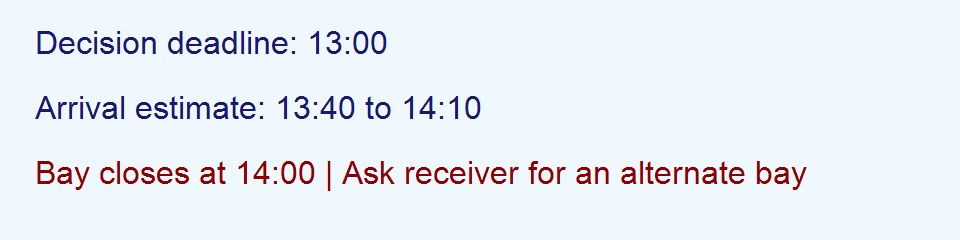
A Johannesburg receiver tells dispatch that the only suitable bay will close at 14:00. The truck expects to arrive between 13:40 and 14:10. Dispatch asks the receiver to confirm an alternate bay by 13:00 and tells the shipper that the appointment is at risk. The driver receives revised gate instructions only after the receiver confirms the change.
Example freight exception update: Job 214. The receiver confirmed that the booked bay closes at 14:00. Estimated arrival is 13:40–14:10. Please confirm an alternate bay by 13:00. Dispatch will update the shipper and driver at 13:00. Until then, the revised bay is provisional.
If the receiver cannot confirm an alternate bay, ask for the next available slot and check whether the operator can wait at an approved location. Record any cost that needs shipper approval. If the revised plan is still pending at 13:00, send the promised update with the current status and a new decision time.
Close the record when the decision is made
Capture who approved the new instruction and when the driver received it. Keep the original appointment and the revised plan under one job reference. If another trip uses the same site, add the bay closing time to the next brief.
Related reading Handle a missed delivery slot and Kweli’s guide to keeping a useful delay record.
Freight exception update checklist
Give the job reference, timestamp, confirmed facts, likely effect and next update time. Name the person who is resolving the issue and record their confirmation separately.
Worked example
Job 214 checked in at 08:00. At 09:10 the site confirmed its forklift was unavailable. Dispatch requests a revised loading estimate and promises a customer update at 09:40, even if the site has no new estimate.
When designing shared job records, capture what happened, the time and location, and the business context. See the GS1 EPCIS visibility standard.
Cover photograph. Independent archival illustration: M18 near Monchegorsk, Russia; 2010. A truck travelling on a snow-covered road beside electricity pylons. Photograph by kallerna under CC BY-SA 3.0. Cropped and resized; no added text or logos.
“An EPCIS event records what was involved in a business process step, when the event took place, where it took place”
GS1 guidance on visibility events
Record the site and actual time beside the update. Keep the receiver’s confirmation separate from the estimate that prompted the request.
Freight exception update FAQs
When should I send the first update?
Send it once you can confirm what happened and who needs to act. Include what is still unknown and give a time for the next update.
Who should approve a revised slot or extra cost?
The receiver confirms unloading capacity. Ask the person named in the accepted terms to approve any cost or scope change.
What if there is no new information by the promised update time?
Send a short update with the confirmed status, the person following up and the next update time.